
English ↔ Mizo Dictionary,
Redefined for Desktop
A stunningly fast, elegant, and fully offline dictionary app built for Windows. No internet, no subscriptions, zero load latency.
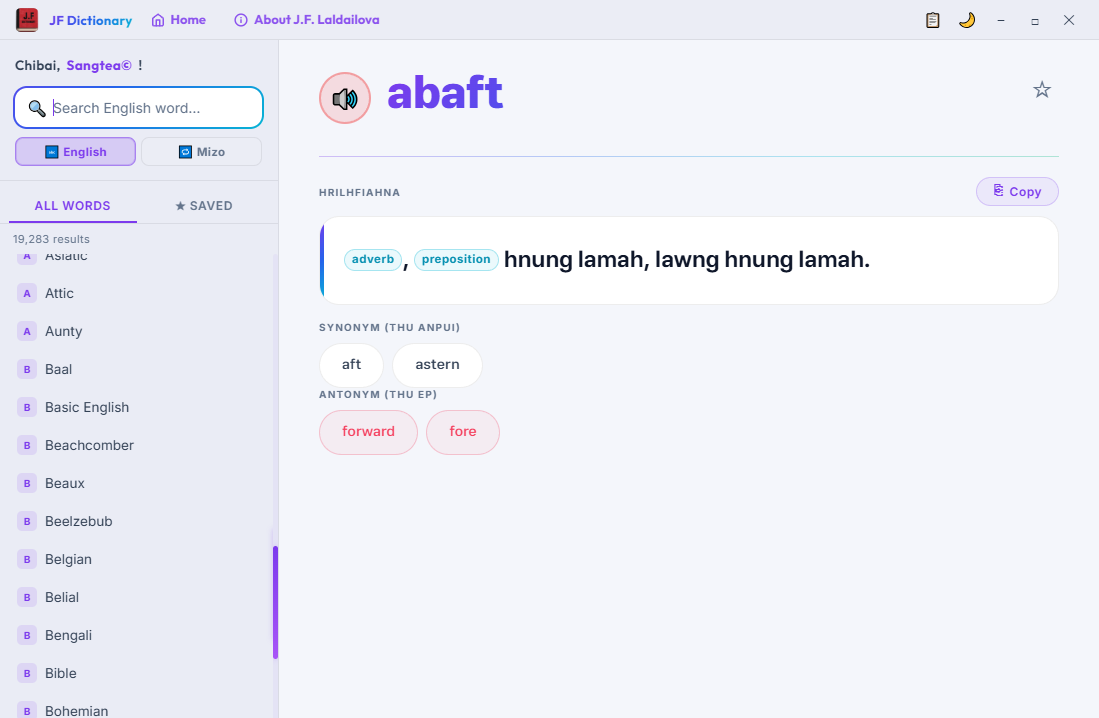
Designed for Visual & Speed Perfection
Packed with powerful features, custom shortcuts, and full SQLite capabilities that standard web dictionaries simply can't touch.
100% Offline Capability
Fully sandboxed SQLite database loaded securely into memory via WebAssembly. Works deep in forests, high in mountains, or during full internet outages.
Instant Search Lookup
Start typing and see results populate at 60fps. Search English word prefixes, or use the Reverse Lookup system to query words by Mizo meanings.
Clipboard Monitoring
Toggle clipboard lookup mode in the titlebar. Whenever you highlight and copy any English word anywhere in your Computer, JF Dictionary instantly displays the translation.
Bookmarks & Favorites
Star rare or important words. They are saved immediately inside a quick-access sidebar bookmark panel so you can study and memorize them later offline.
Summon Hotkey
Configured with global desktop shortcut mapping. Press Ctrl + Shift + D anywhere on your system to immediately overlay and focus the app window.
Privacy First, No Ads
No user metrics, no analytics telemetry, and absolutely no ad trackers. The app runs completely on your system, keeping your lookups 100% private.
Supercharge with Keyboard Shortcuts
Who needs a mouse? Navigate, search, clear, and summon the dictionary globally using standard built-in quick keys.
Global Summon Overlay
Brings the dictionary window to the absolute foreground from any external active application or window instantly.
Navigate down to Word List
Moves focus from the search input box directly to the matches sidebar so you can select terms without a mouse.
Navigate Sidebar Matches
Move up and down the list of offline matching dictionary suggestions easily.
Confirm Definition Selection
Loads the selected word definition page immediately in the right pane.
Clear Search & Return Home
Clears active queries, resets list filters, and resets the interface back to the homescreen dashboard.